Game strategy
School Run Guide: Safer Lanes, Better Timing and Checkpoint Progress
Learn the three-lane runner’s controls, hearts, collectibles and checkpoint starts without losing sight of the road.
Play School Run →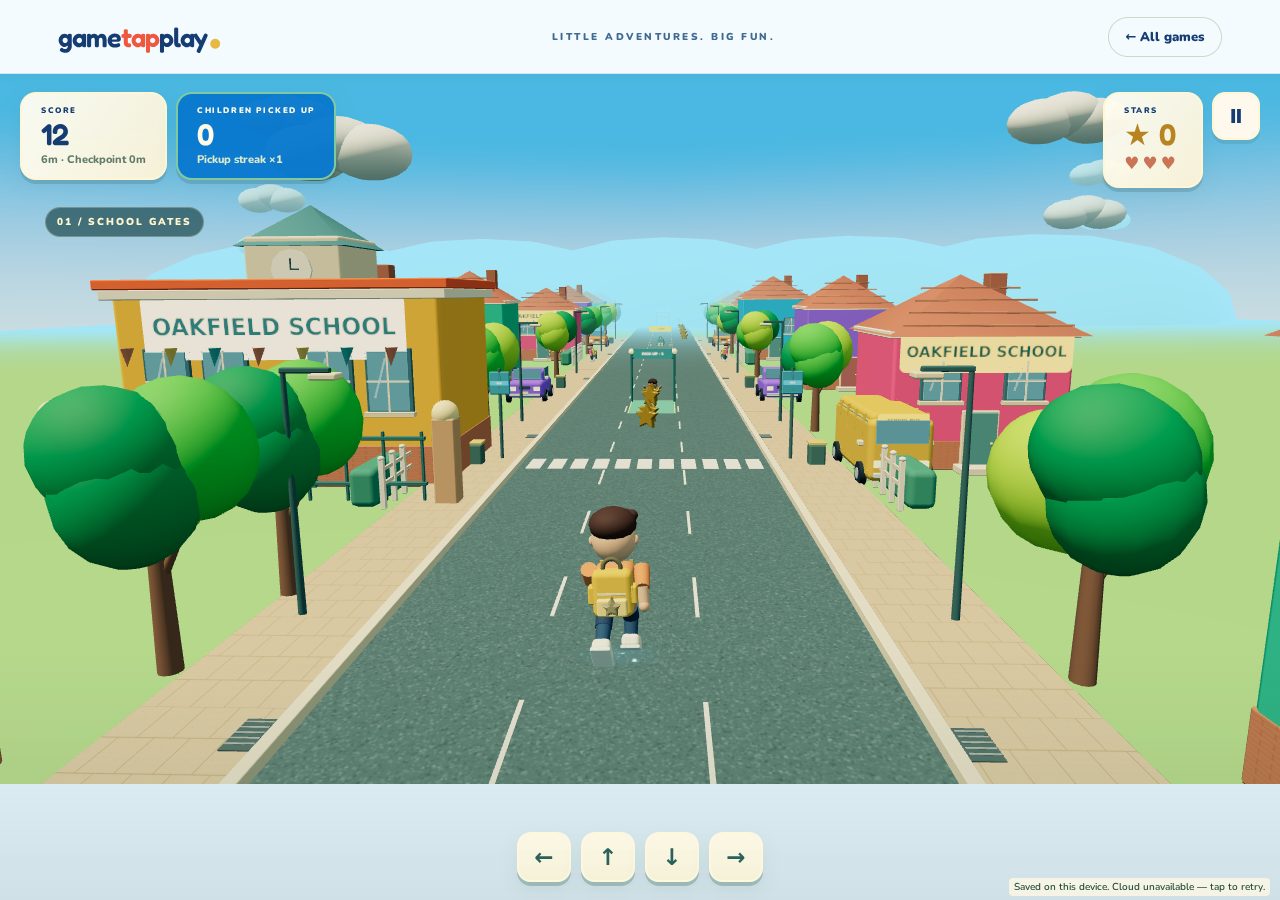
School Run is a three-lane endless runner about reading the road ahead. Your runner moves forward automatically while you switch lanes, jump barriers and slide under beams. Stars and supplies make tempting routes, and children you collect form a following crew. A strong run depends on choosing a safe action before an obstacle arrives, rather than reacting to every collectible at the last instant.
Your objective and the basic loop
Travel farther, build a personal score and collect useful rewards while keeping your runner alive. You begin with three hearts. Collisions cost health, followed by a brief period of collision immunity. That recovery window is a chance to return to a clear route, not a reason to stay in danger.
The road speeds up gradually, so the same obstacle spacing gives you less decision time later. Early obstacles introduce jumping and sliding. Rows have at most two blocked lanes, and every fifth row is a safe pickup row. Look for the available route through a row before focusing on the stars within it.
Desktop controls
Use Left and Right arrows or A and D to switch lanes. Up, W or Space jumps. Down or S slides. Escape or P pauses. Each action should answer a visible road problem: jump a low barrier, slide beneath a high beam or change lanes when that offers the clearer path.
Practise one input at a time at the start of a run. Repeatedly pressing a direction without looking can carry you away from the lane you meant to use. Pause before reading menus or leaving the keyboard, especially once the pace increases.
Mobile controls
Swipe left or right on the game canvas to change lanes, up to jump and down to slide. On-screen direction buttons offer an alternative if swipes are uncomfortable. Keep your touch movement clear and deliberate so a diagonal gesture does not become an unintended action.
Use the pause button before repositioning your hands or adjusting the device. Hiding the tab pauses gameplay, but deliberately pausing gives you a clearer return point. Sound and supported-device vibration have separate settings, so you can adjust feedback without changing the controls.
Hearts, collectibles and checkpoint starts
Stars contribute to the game's reward progression, while supplies and power effects change what is happening during a run. Read the active power display instead of assuming a pickup will last indefinitely. The following crew is part of the run's feedback and collection loop; keep watching the obstacles beyond the group.
Checkpoints unlock at 500 metres, 1,000 metres and every 1,000 metres afterwards. Choose an unlocked checkpoint from the menu to begin a new run at that distance. It starts with zero score and full health, with speed and scenery appropriate to the starting distance. It does not restore a previous run's score or crew.
Continue is different: it consumes an existing revive ticket, preserves the current run's score and crew, and is available at most once per run. Both checkpoint starts and continues clear nearby obstacles and give four seconds of collision protection after the fade.
Beginner tips for longer runs
Treat the first few attempts as control practice. Choose a clear lane early, then make the jump or slide with enough time for it to take effect. Watch farther up the road than your runner's feet. The useful question is what the next row requires, not what you have just passed.
Skip a reward if reaching it would require a rushed second lane change. Recovering from one missed star is easy; recovering lost hearts is a much larger problem. When hurt, use the brief protection to stabilise your route and resume reading ahead.
Advanced strategy and common mistakes
As speed rises, reduce unnecessary movement. Decide which lane takes you through the next row with the fewest actions, then reassess. A planned lane change plus one jump is easier to execute consistently than weaving after every pickup.
Use unlocked checkpoints to practise faster sections. Compare records from the same starting point: a checkpoint run and a run from zero test different stretches of road. Avoid spending your only Continue immediately out of habit; first consider whether you are ready to resume the current pace.
A common mistake is confusing a checkpoint with a suspended game. Another is watching the score while entering a difficult row. Check statistics between attempts, and make survival your scoring strategy during play. Rewards bank as earned deltas, including checkpoint progress, so a Continue does not duplicate earlier earnings.
Frequently asked questions
How many hearts do I start with?
Three. Collisions remove health and briefly grant collision immunity.
Does a checkpoint preserve my score?
No. It begins a new run with zero score and full health at the selected distance.
Can I revive more than once per run?
No. Continue uses one existing ticket and is limited to once per run.
Do I need swipe controls on mobile?
No. You can use the on-screen direction buttons instead.
Is there a public leaderboard?
No. The game records personal progress and scores for your browser profile.
Take the next run one row at a time
Open School Run, practise the jump and slide, then aim for your next checkpoint. A clear route and a calm input are more valuable than collecting every star on a risky line.