Game strategy
Cosmic Strike Guide: Survive the Waves and Defeat Planetary Guardians
Use shields, boost, nova and permanent upgrades to work through nine planets and unlock Infinite Galaxy.
Play Cosmic Strike →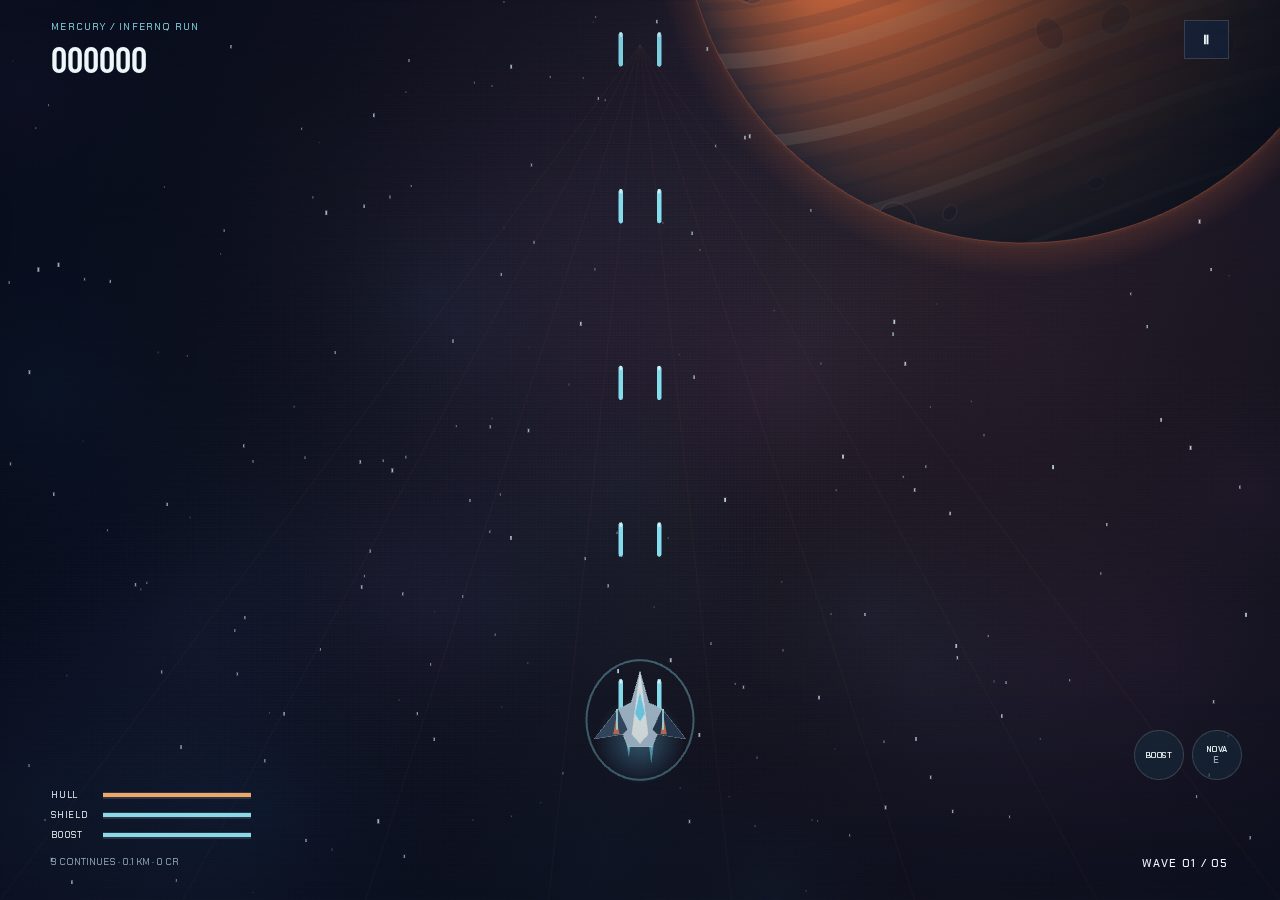
Cosmic Strike puts you in a starfighter facing waves of enemies, environmental hazards and planetary guardians. Shooting matters, but survival depends just as much on movement and knowing when to use your defensive tools. Your hull and shields have separate meters, and a well-timed boost or nova can turn a crowded screen into a recoverable situation.
Campaign objective and progression
The campaign spans nine planetary missions. Each planet contains five enemy waves followed by a guardian with three phases. Clear the encounter to progress through the planetary route. Completing Pluto unlocks Infinite Galaxy, an endless mode with generated worlds, escalating opposition and recurring bosses.
Campaign checkpoints save at wave boundaries, including before a guardian. Each campaign attempt has three checkpoint continues. Restarting a planet resets that attempt; an endless defeat requires a new run. Read the checkpoint option in the menu before starting over if your goal is to continue existing campaign progress.
Desktop controls and firing
Use WASD or the arrow keys to steer. Space fires, Shift activates boost, E triggers nova and Escape pauses. Auto-fire starts enabled, letting you focus on steering while the ship shoots. If you prefer manual firing, check the game's settings and keep Space within easy reach.
Practise moving a short distance and stopping where you intended. Holding a direction until you reach the edge can leave no room for the next pattern. A smaller adjustment often gives you an escape route on both sides.
Mobile controls
Drag on the playfield to steer. Touch controls include Fire, Boost and Nova, with optional direction controls available. With auto-fire enabled, keep most of your attention on the path through incoming projectiles and use the ability buttons deliberately.
Find a comfortable finger position before starting a wave. If your hand hides part of the field, adjust your grip while paused rather than trying to compensate during a crowded encounter. Switching tabs pauses combat, and the visible pause control lets you stop without leaving the page.
What the defensive tools actually do
Boost grants brief immunity, so it can help you cross a dangerous pattern as well as reposition. It is not permanent protection: watch its cooldown and avoid finishing the movement inside another threat. Nova clears enemy projectiles, making it especially useful when several incoming paths overlap.
Keep hull, shield and cooldown information in your peripheral view. A shield meter should inform your risk decisions, but staring at the HUD can make you miss an approaching hazard. Read the playfield first and check the meters during a quieter moment.
Beginner strategy: learn one wave at a time
Begin on Mercury and learn how enemy fire crosses the screen. Move because a path is becoming unsafe, not simply because you have not moved for a second. When an environmental warning appears, identify the threatened area before collecting nearby salvage.
Try to finish each wave with a clear understanding of what caused damage. If you were trapped near an edge, leave more space next attempt. If you missed a warning, practise looking farther from your ship. Checkpoints make it practical to concentrate on the wave currently giving you trouble.
Advanced upgrades and guardian tactics
The Hangar offers ships with different hull, shield, speed and damage statistics. Destroyers carry plasma cannons; Titans add automatic homing missiles. A higher damage option still needs a movement style you can control, so compare the full set of statistics instead of picking solely by appearance.
Permanent upgrades and ship unlocks use saved resources. Crystals and weapon parts can be refined into credits in Upgrades. Inspect those options between attempts before assuming you must repeat a difficult section with exactly the same equipment.
Against a guardian, treat each phase as a new pattern to observe. Keep some lateral room, watch telegraphed hazards and save a defensive action for a genuinely crowded moment. Clearing bullets with nova is more useful when it creates a route you can actually take. Use boost with a destination in mind, rather than pressing it only after the ship is already boxed in.
Common mistakes and higher-score habits
Do not chase every pickup through incoming fire. Staying alive gives you more waves in which to earn resources and points. Do not spend boost and nova together without checking whether one would solve the immediate problem. Preserve another option when the next pattern is unknown.
Avoid confusing local progress with an account save. Campaign progress, upgrades and settings live in this browser. If storage is unavailable, a session-only notice appears. Clearing site storage removes the saved progress, and there is no cross-device sync.
Frequently asked questions
How do I unlock Infinite Galaxy?
Complete Pluto in the nine-planet campaign.
Do I need to hold Fire continuously?
Auto-fire is enabled by default. Space and the touch Fire control are also available.
What does nova clear?
Enemy projectiles. Use it to make space during crowded patterns.
How many checkpoint continues are available?
Three per campaign attempt. Restarting a planet resets the attempt.
Does progress transfer to another device?
No. This game's save is stored locally in the current browser.
Launch with a survival plan
Play Cosmic Strike and focus first on clean movement through Mercury. Add upgrades and smarter ability timing as you learn the waves, then carry those habits toward Pluto and the Infinite Galaxy beyond.